MORE LISTINGS OR BETTER LISTINGS - WHAT ACTUALLY DRIVES SALES

100 listings sound better than 20.
More options mean more chances to sell, right?
Not always.
Many Indian D2C sellers assume a larger catalog automatically leads to more revenue. The logic seems straightforward: if 20 SKUs generate sales, then 100 SKUs should generate even more.
But ecommerce doesn't work that way.
As catalogs grow, traffic gets spread across more product pages, marketing budgets become thinner, and product information often becomes inconsistent. The result? Dozens of listings competing for attention without converting.
Meanwhile, brands with fewer, highly optimized listings often generate stronger conversion rates, better ad performance, and higher revenue from the same amount of traffic.
The real question isn't how many products you list. It's whether your listings are good enough to convert.
This is the product listing optimization math that separates brands scaling to ₹1 crore from brands stuck at ₹10 lakhs.
More options mean more chances to sell, right?
Not always.
Many Indian D2C sellers assume a larger catalog automatically leads to more revenue. The logic seems straightforward: if 20 SKUs generate sales, then 100 SKUs should generate even more.
But ecommerce doesn't work that way.
As catalogs grow, traffic gets spread across more product pages, marketing budgets become thinner, and product information often becomes inconsistent. The result? Dozens of listings competing for attention without converting.
Meanwhile, brands with fewer, highly optimized listings often generate stronger conversion rates, better ad performance, and higher revenue from the same amount of traffic.
The real question isn't how many products you list. It's whether your listings are good enough to convert.
This is the product listing optimization math that separates brands scaling to ₹1 crore from brands stuck at ₹10 lakhs.
Why Fewer Optimized Product Listings Convert Better
Let's run the actual math on two sellers with identical traffic and ad budgets:
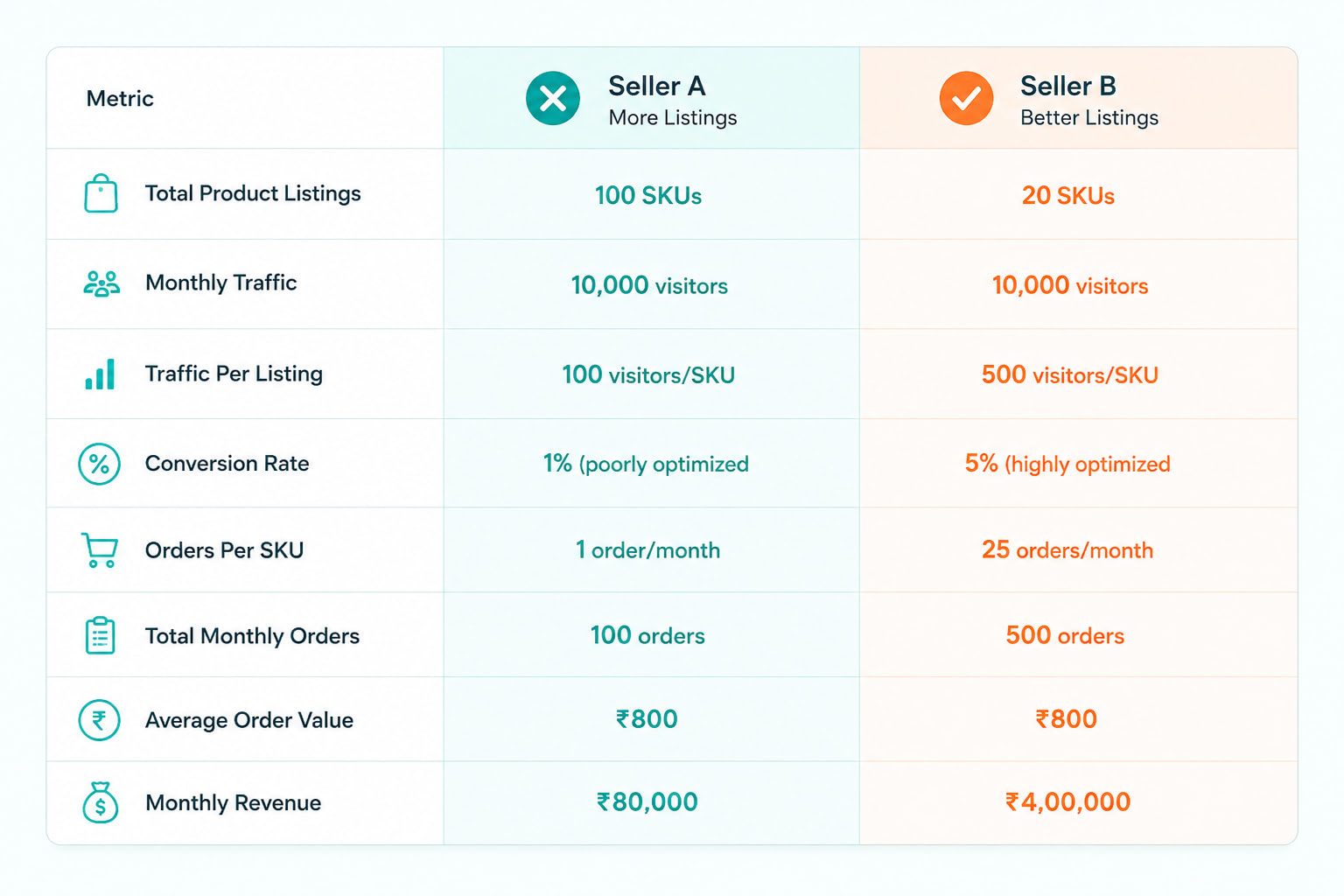
Same traffic. Same ad spend. 5x revenue difference.
Here's why Seller B wins:
• Focused Traffic: 500 visitors per listing means statistically significant data to optimize. 100 visitors per listing is noise, you can't tell what's working.
• Better Optimization: With 20 SKUs, you can afford professional photography, detailed descriptions, A+ content, and regular A/B testing. With 100 SKUs, you're cutting corners everywhere.
• Stronger Inventory Management: Stocking 20 SKUs deeply beats stocking 100 SKUs thin. Out-of-stock kills conversion.
• Clearer Brand Identity: 20 curated products tell a story. 100 random products look like a warehouse clearance.
This is product catalog optimization in action - fewer, better product listings that actually improve ecommerce sales instead of diluting them.
• Focused Traffic: 500 visitors per listing means statistically significant data to optimize. 100 visitors per listing is noise, you can't tell what's working.
• Better Optimization: With 20 SKUs, you can afford professional photography, detailed descriptions, A+ content, and regular A/B testing. With 100 SKUs, you're cutting corners everywhere.
• Stronger Inventory Management: Stocking 20 SKUs deeply beats stocking 100 SKUs thin. Out-of-stock kills conversion.
• Clearer Brand Identity: 20 curated products tell a story. 100 random products look like a warehouse clearance.
This is product catalog optimization in action - fewer, better product listings that actually improve ecommerce sales instead of diluting them.
Product Listing Optimization Checklist
If you're going to sell fewer SKUs, they need to be bulletproof. Here's the product listing optimization checklist that turns browsers into buyers:
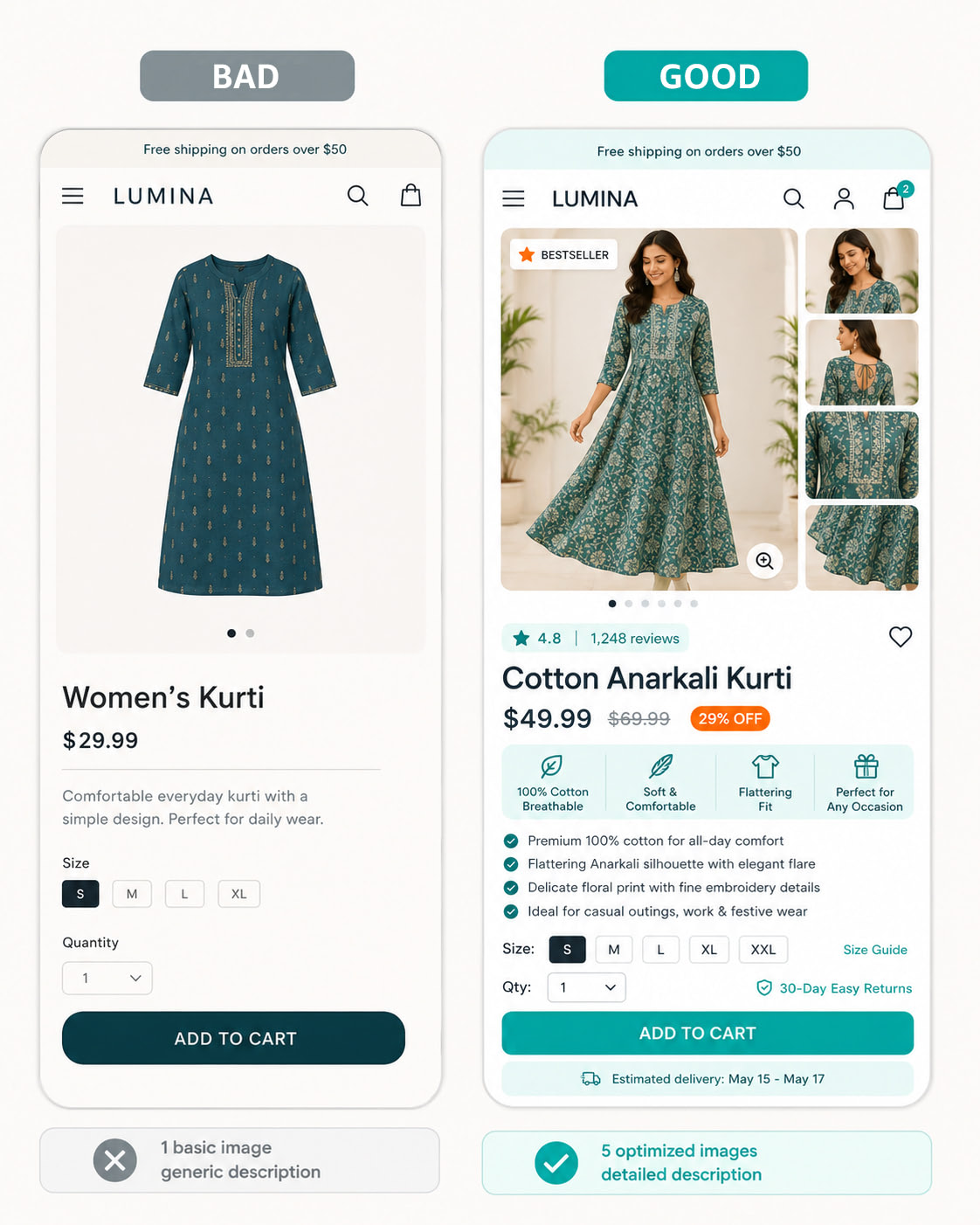
- Titles that Convert
Bad title: "Women's Kurti"
Good title: "Cotton Anarkali Kurti for Women | Block Print | Free Size | Royal Blue"
What optimized titles include:
• Primary keyword upfront (Cotton Anarkali Kurti)
• Key feature (Block Print, Free Size)
• Color/variant (Royal Blue)
• 60-80 characters max (mobile-friendly) - Images that Sell
Minimum 5 images per listing:
• Main product on white background (clean, professional)
• Lifestyle shot (product in use - model wearing, product styled)
• Close-up showing fabric/material/craftsmanship
• Size guide or dimension reference
• Packaging/unboxing shot (builds premium perception)
Amazon Smart Commerce's Catalog Agent (launched April 2026) uses AI to generate professional lifestyle images and model photoshoots automatically. Clothing items get routed to model generation, while home decor gets lifestyle scene generation - all without expensive photoshoots. - Product Descriptions that Answer Questions
Don't just list features. Answer the questions customers are thinking about:
• What is this made of? (Material, fabric composition, certifications)
• How do I use/care for it? (Washing instructions, maintenance, storage)
• Why should I buy this? (Benefits, use cases, problems solved)
• Will it fit/work for me? (Size chart, compatibility, age recommendations)
For mobile devices this translates to shorter paragraphs, bullet points for key features and scannable subheaders. - Clear CTAs and Trust Signals
Call-to-actions (CTAs) are what tip people over from browsing to buying.
Similarly trust signals such as customer reviews, clear return & refund policy, trustworthy payment options make the decisions easier.
Amazon Smart Commerce's mobile-optimized themes ensure CTAs ("Add to Cart," "Buy Now") are thumb-friendly and checkout is frictionless - critical when 80%+ of Indian traffic is mobile.
Similarly trust signals such as customer reviews, clear return & refund policy, trustworthy payment options make the decisions easier.
Amazon Smart Commerce's mobile-optimized themes ensure CTAs ("Add to Cart," "Buy Now") are thumb-friendly and checkout is frictionless - critical when 80%+ of Indian traffic is mobile.
Amazon Smart Commerce Listing Optimization: Auto-Tools That Scale Quality
Optimizing 100 listings manually is impossible. Optimizing 20 listings manually is slow. Smart Commerce by Amazon listing optimization tools automate the heavy lifting so you can maintain quality at scale.
- A+ Content for Premium Positioning
A+ Content (enhanced product descriptions with rich media) increases conversion by 10-15% on average. Amazon Smart Commerce makes A+ content creation simple:
• Drag-and-drop layout builder
• Pre-designed templates for different categories
• Mobile-first responsive design
• Brand storytelling sections
Use A+ Content on your top 20 SKUs to differentiate from competitors still using basic text descriptions. - Analytics: Traffic on Products & Categories
You can't optimize what you don't measure. Amazon Smart Commerce analytics help you maximize traffic by doing these simple steps!
• Track which products get the most views to identify your customers interest.
• Understand where customers drop off in the buying journey (product page, cart, or checkout).
• Identify products with high traffic but low conversions to improve performance.
• Analyze which product categories generate the most revenue.
• Monitor seasonal trends and demand patterns for better inventory and campaign planning.
• Compare category-wise conversion rates to understand which segments perform best.
Use this data to double down on high-performing product listings and either optimize or cut underperformers. This is how you maintain a lean, high-converting product catalog. - Mobile-First Themes
Over 75% of India's e-commerce traffic comes from smartphones (as per Bain & Company, 2026). If your product listings don't load fast and look good on mobile, you're losing sales.
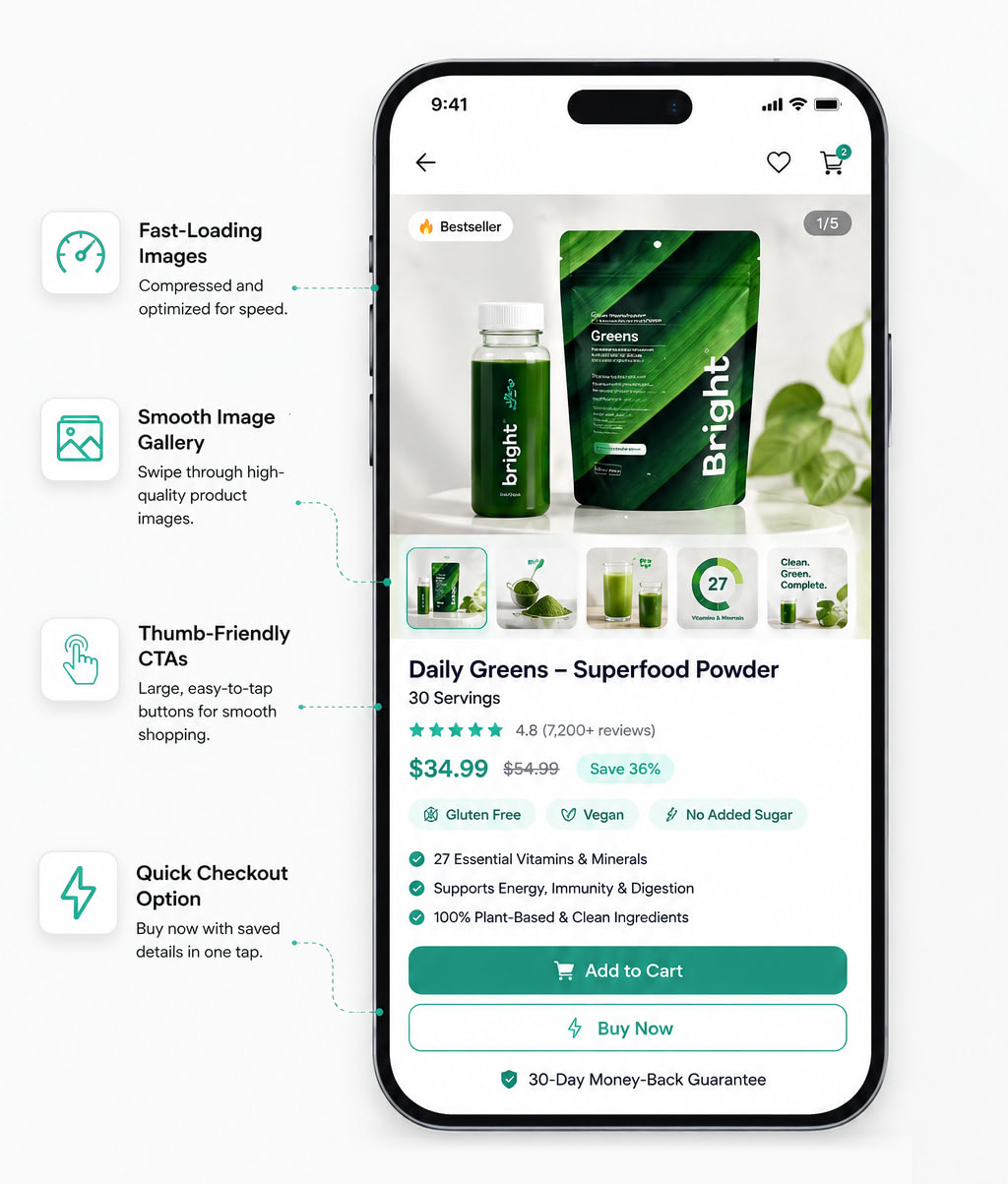
Amazon Smart Commerce's mobile-optimized themes:
• Load in under 2 seconds
• Thumb-friendly navigation and CTAs
• Image galleries that swipe smoothly
• One-tap checkout with saved payment methods
In a market where most ecommerce traffic comes from smartphones, these optimizations directly reduce drop-offs and improve conversions.
• Load in under 2 seconds
• Thumb-friendly navigation and CTAs
• Image galleries that swipe smoothly
• One-tap checkout with saved payment methods
In a market where most ecommerce traffic comes from smartphones, these optimizations directly reduce drop-offs and improve conversions.
Why Too Many SKUs Hurt Ecommerce Conversion Rates
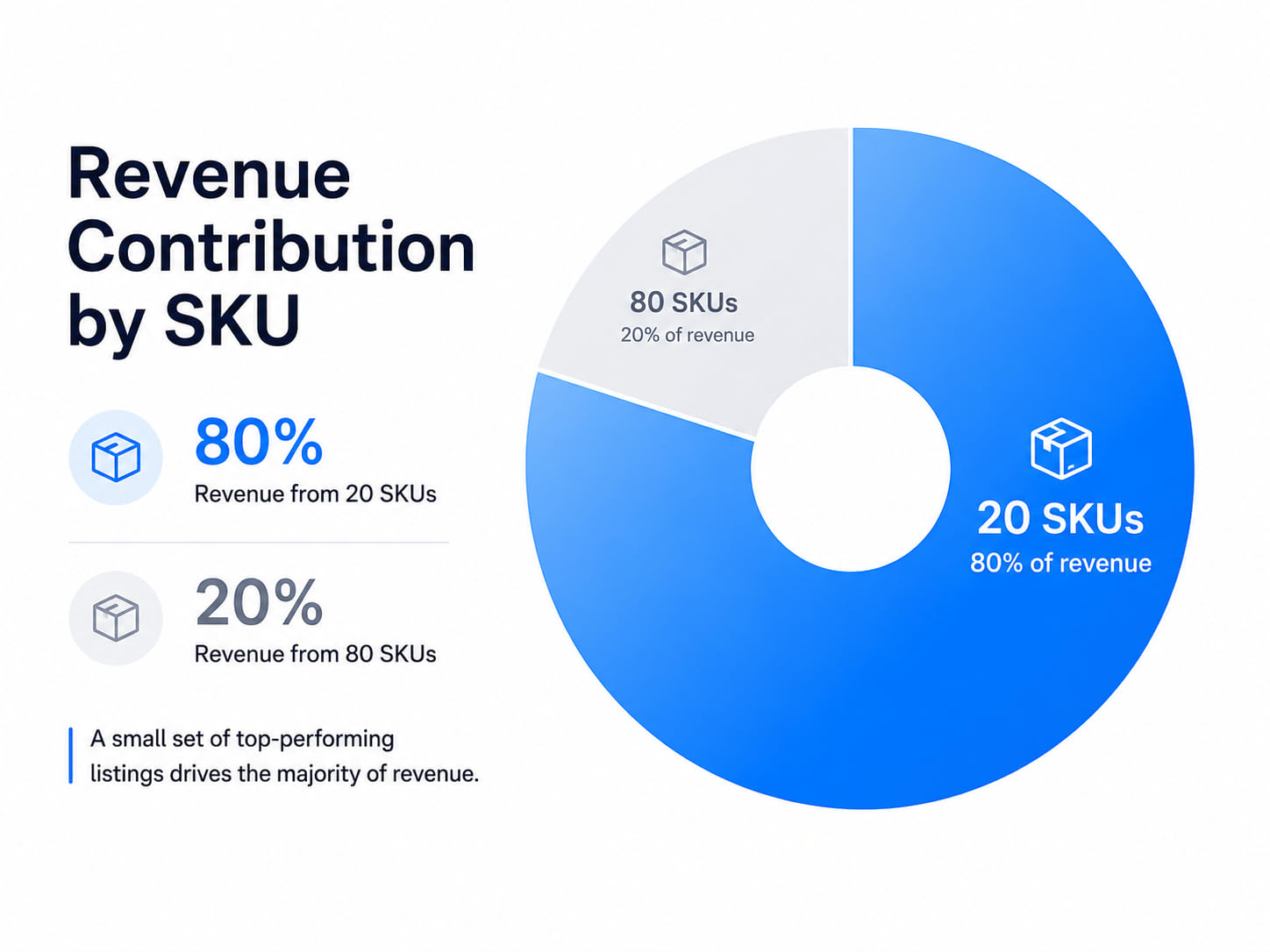
Here's the test: Check your analytics for the last 90 days.
How many of your SKUs drove 80% of revenue?
For most sellers, it's around 15-25 SKUs. The other 75-85 SKUs are generating only noise, not sales.
How many of your SKUs drove 80% of revenue?
For most sellers, it's around 15-25 SKUs. The other 75-85 SKUs are generating only noise, not sales.
What if you:
• Cut underperforming SKUs
• Invested that freed-up inventory budget into your top 20 performers
• Used Amazon Smart Commerce listing optimization tools to perfect those 20 listings
• Ran all your ad budget to those proven winners
You'd 3-5x revenue without spending another rupee on ads or inventory.
This is product catalog optimization - not more listings, but better listings that actually improve ecommerce sales.
• Cut underperforming SKUs
• Invested that freed-up inventory budget into your top 20 performers
• Used Amazon Smart Commerce listing optimization tools to perfect those 20 listings
• Ran all your ad budget to those proven winners
You'd 3-5x revenue without spending another rupee on ads or inventory.
This is product catalog optimization - not more listings, but better listings that actually improve ecommerce sales.
How to Improve Ecommerce Sales With Better Product Listings
The brands scaling from ₹10 lakhs to ₹1 crore aren't the ones with 200 SKUs. They're the ones with 20-30 bulletproof listings that convert at 5%+ instead of 100 mediocre listings converting at 1%.
- Audit your current catalog: Identify your top 20 SKUs by revenue (last 90 days)
- Apply the optimization checklist: Titles, images, descriptions, trust signals
- Cut or pause underperformers: Free up budget and focus
- Double down on winners: More inventory, more ads, better optimization
Remember: ecommerce sales aren't about how many product listings you have. They're about how many of those listings actually convert.
The fastest-growing ecommerce brands don’t win with the biggest catalogs.They win with the highest-converting product listings.
Start by optimizing your top-performing SKUs before expanding your catalog further.
The fastest-growing ecommerce brands don’t win with the biggest catalogs.They win with the highest-converting product listings.
Start by optimizing your top-performing SKUs before expanding your catalog further.
COMPANY


Built in

© 2026 Amazon.com, Inc. or its affiliates. All rights reserved