
Lookbook Feature Guide: Turn Product Browsing into More Sales
A customer is shopping for a party dress online and spots a photo she loves! It's not just the dress that catches her eye; it's the complete look. The heels, the clutch, the earrings, where everything works together.
On most online stores, she can only click on the dress. To find the rest, she either has to search through dozens of products herself or leave the store altogether.
But what if she could simply tap on the image and shop for every item she's looking at?
That's exactly the problem the Lookbook Widget solves. Instead of showing products in isolation, it lets customers shop directly from lifestyle images.
The result? Higher average order value, effortless product discovery ecommerce, and a shopping experience that feels premium rather than transactional.
On most online stores, she can only click on the dress. To find the rest, she either has to search through dozens of products herself or leave the store altogether.
But what if she could simply tap on the image and shop for every item she's looking at?
That's exactly the problem the Lookbook Widget solves. Instead of showing products in isolation, it lets customers shop directly from lifestyle images.
The result? Higher average order value, effortless product discovery ecommerce, and a shopping experience that feels premium rather than transactional.
Why Lookbooks Are Changing Ecommerce
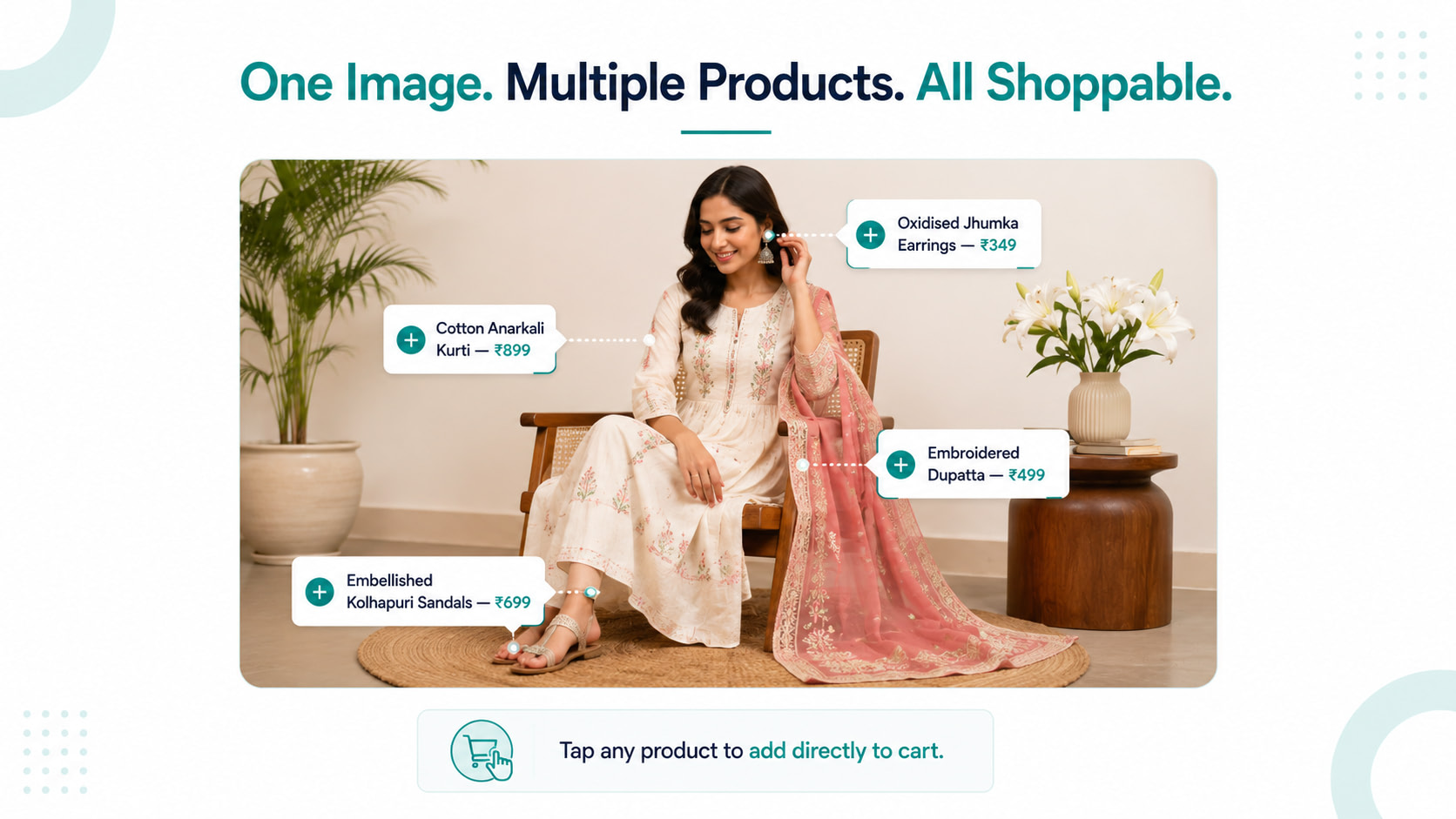
A digital lookbook is an interactive storefront section where products are tagged directly. Think of it like a magazine editorial that customers can shop from directly. This is modern visual merchandising in ecommerce – turning inspiration into an instant path to purchase.
Which Brands Benefit Most From the Lookbook Widget
Not every product category benefits equally from a lookbook. The feature works best when customers make decisions based on inspiration, aspiration, or how multiple items work together rather than a single functional need.
Beauty and skincare brands can showcase complete routines, like cleanser, serum, moisturizer, and SPF, as a curated flat-lay where every product is one tap away from the cart.
Fashion and ethnic wear are the most obvious fit. Customers buying a kurta often think about the complete look: dupatta, jewellery, and footwear. A lookbook shows a complete outfit and makes every piece shoppable from one image.
Home decor and furniture brands benefit enormously because context sells. A sofa looks different in a styled living room with coordinating cushions, a rug, and a coffee table. When all of those are tagged and shoppable, cross-selling products happens naturally.
Jewellery and accessories brands can show multiple pieces worn together, demonstrating styling combinations that customers wouldn't necessarily discover browsing individual product pages.
For gifting and lifestyle categories, the lookbook doubles as a curated gift guide: styled, aspirational, and fully shoppable.
Beauty and skincare brands can showcase complete routines, like cleanser, serum, moisturizer, and SPF, as a curated flat-lay where every product is one tap away from the cart.
Fashion and ethnic wear are the most obvious fit. Customers buying a kurta often think about the complete look: dupatta, jewellery, and footwear. A lookbook shows a complete outfit and makes every piece shoppable from one image.
Home decor and furniture brands benefit enormously because context sells. A sofa looks different in a styled living room with coordinating cushions, a rug, and a coffee table. When all of those are tagged and shoppable, cross-selling products happens naturally.
Jewellery and accessories brands can show multiple pieces worn together, demonstrating styling combinations that customers wouldn't necessarily discover browsing individual product pages.
For gifting and lifestyle categories, the lookbook doubles as a curated gift guide: styled, aspirational, and fully shoppable.

How the Lookbook Widget Improves the Customer Experience
Standard product pages answer one question: "What does this item look like?" A shoppable lookbook answers a much more useful question: "How do I use this, style this, or live with this?"
This shift in context transforms the online shopping experience in three specific ways.
First, it increases the average order value naturally. When customers see products styled together, they buy together. Instead of buying a single item, customers are more likely to add complementary products to their cart because they can see how everything works together.
Second, it makes product discovery ecommerce effortless. Customers stumble onto products they wouldn't have searched for because those products appear in context, doing a job they recognize. The dupatta that completes an outfit. The side table that makes a sofa makes sense.
Third, it creates a premium perception. Brands that invest in lifestyle photography and lookbook photography look more established and trustworthy than brands showing the same products on plain backgrounds. The shopping experience signals quality before a customer reads a single word of your product description.
This shift in context transforms the online shopping experience in three specific ways.
First, it increases the average order value naturally. When customers see products styled together, they buy together. Instead of buying a single item, customers are more likely to add complementary products to their cart because they can see how everything works together.
Second, it makes product discovery ecommerce effortless. Customers stumble onto products they wouldn't have searched for because those products appear in context, doing a job they recognize. The dupatta that completes an outfit. The side table that makes a sofa makes sense.
Third, it creates a premium perception. Brands that invest in lifestyle photography and lookbook photography look more established and trustworthy than brands showing the same products on plain backgrounds. The shopping experience signals quality before a customer reads a single word of your product description.

How to Set Up the Lookbook Widget on Amazon Smart Commerce
Setting up a lookbook template on Amazon Smart Commerce is straightforward and doesn't require any design expertise.
Start with strong lifestyle photography. This is the foundation – without quality images that show products in real-world settings, the feature can't do its job. You don't need expensive studio shoots; well-lit, naturally styled photos work perfectly.
Once you have your images, add the Lookbook Widget to your storefront through the Amazon Smart Commerce builder. Upload the lifestyle image and use the product tagging tool to mark each item in the photograph. Each tag links directly to that product's page and allows customers to add to cart without leaving the lookbook.
The process in brief:
• Add the Lookbook Widget to your storefront via the page builder
• Upload a high-quality lifestyle image that naturally showcases multiple products together.
• Tag each visible product using the product tagging tool
• Add product name and price to each tag
• Publish and place the lookbook section where it gets maximum visibility, ideally above the fold on your homepage or category pages
Update your lookbooks seasonally to stay relevant. A Diwali festive lookbook, a summer collection lookbook, a wedding season lookbook – these keep the feature fresh and give customers a reason to come back.
Start with strong lifestyle photography. This is the foundation – without quality images that show products in real-world settings, the feature can't do its job. You don't need expensive studio shoots; well-lit, naturally styled photos work perfectly.
Once you have your images, add the Lookbook Widget to your storefront through the Amazon Smart Commerce builder. Upload the lifestyle image and use the product tagging tool to mark each item in the photograph. Each tag links directly to that product's page and allows customers to add to cart without leaving the lookbook.
The process in brief:
• Add the Lookbook Widget to your storefront via the page builder
• Upload a high-quality lifestyle image that naturally showcases multiple products together.
• Tag each visible product using the product tagging tool
• Add product name and price to each tag
• Publish and place the lookbook section where it gets maximum visibility, ideally above the fold on your homepage or category pages
Update your lookbooks seasonally to stay relevant. A Diwali festive lookbook, a summer collection lookbook, a wedding season lookbook – these keep the feature fresh and give customers a reason to come back.
The Right Way to Use It: Do's and Don'ts
The Lookbook feature is a smart tool when used with intention. Here's what separates lookbooks that convert from lookbooks that just look nice.
Do's:
• Use genuine lifestyle photography where products are styled naturally, not posed artificially
• Tag 3-5 products per image to keep the experience clean and browsable
• Mix price points within one look so customers at different budgets find something
• Place tags away from faces and focal points so they don't obscure the image
• Update seasonally to reflect current collections and trends
Don'ts:
• Avoid tagging too many products in a single image – it creates visual clutter, especially on mobile devices.
• Use the same products across every lookbook without variation
• Ignore how tags display on mobile screens, where placement matters more than desktop
• Treat the lookbook as a product dump: it should feel curated, not comprehensive
Do's:
• Use genuine lifestyle photography where products are styled naturally, not posed artificially
• Tag 3-5 products per image to keep the experience clean and browsable
• Mix price points within one look so customers at different budgets find something
• Place tags away from faces and focal points so they don't obscure the image
• Update seasonally to reflect current collections and trends
Don'ts:
• Avoid tagging too many products in a single image – it creates visual clutter, especially on mobile devices.
• Use the same products across every lookbook without variation
• Ignore how tags display on mobile screens, where placement matters more than desktop
• Treat the lookbook as a product dump: it should feel curated, not comprehensive
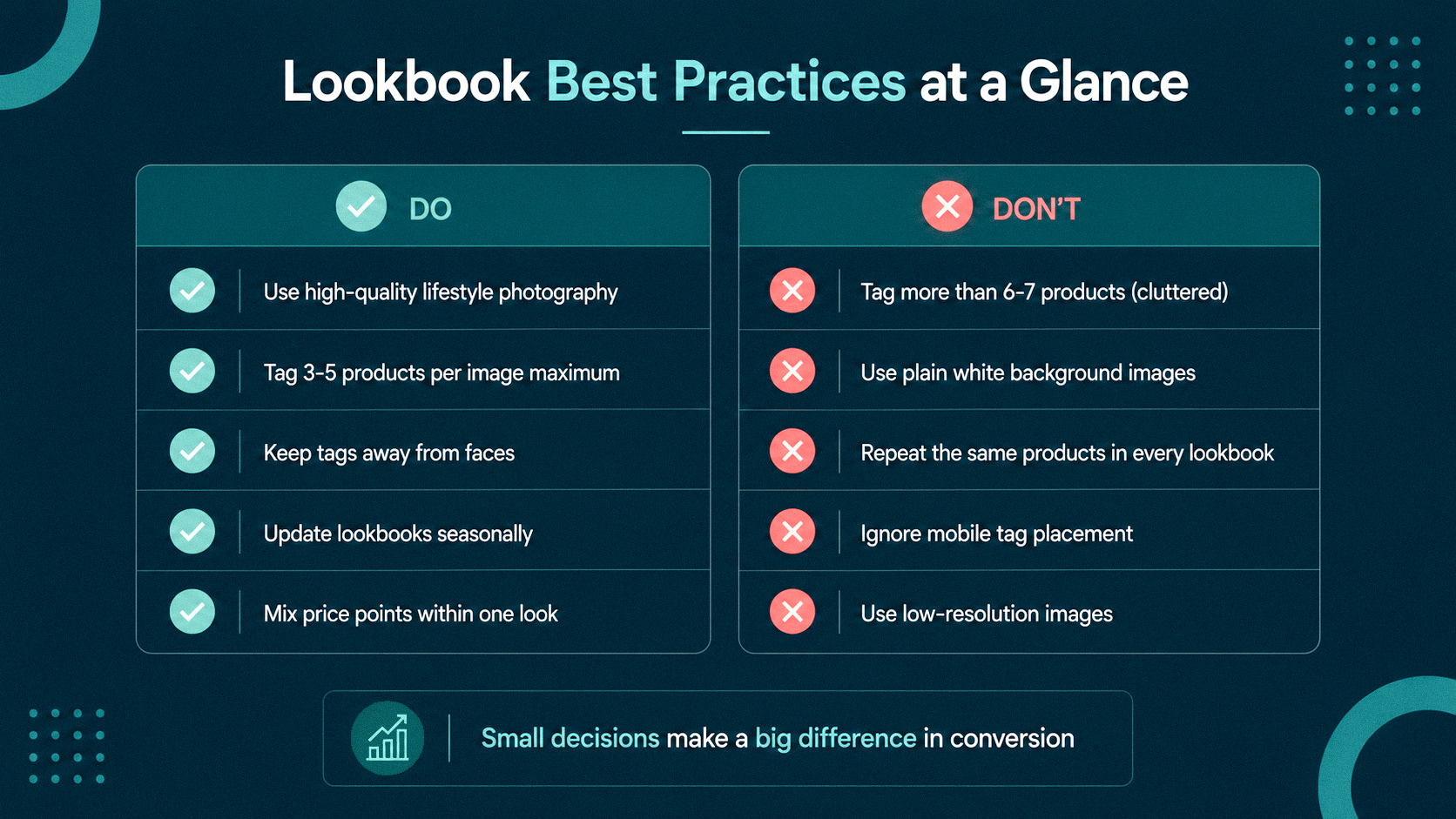
The difference between a lookbook that increases ecommerce customer experience and one that just exists on the page comes down to intentional curation over volume.
What a Good Lookbook Looks Like in Practice
Imagine a jewellery brand with 40 SKUs. Instead of showing earrings, necklaces, and maang tikkas on separate product pages, they create one lifestyle image: a model wearing a complete bridal look with every piece styled together.
Every item is tagged. Customers who landed looking for earrings end up adding three pieces to the cart because the complete look made sense together. That's the Lookbook Widget doing exactly what it was designed to do – turning inspiration into conversion.
The same logic applies to home decor, beauty routines, ethnic fashion, and gifting. Show the full picture, tag every piece, and let customers shop the moment they're inspired.
Every item is tagged. Customers who landed looking for earrings end up adding three pieces to the cart because the complete look made sense together. That's the Lookbook Widget doing exactly what it was designed to do – turning inspiration into conversion.
The same logic applies to home decor, beauty routines, ethnic fashion, and gifting. Show the full picture, tag every piece, and let customers shop the moment they're inspired.
Stop Showing Products. Start Showing Stories.
A product grid answers "what do you sell?" A lookbook answers "why should I want it?"
The brands growing fastest in Indian ecommerce aren't just selling products anymore. They're curating experiences, using shoppable lookbook features to turn lifestyle inspiration into instant purchases.
The Lookbook Widget is now available on Amazon Smart Commerce. Start showcasing complete looks, tag your products, and transform your storefront into an experience customers want to explore, not just another product catalog.
The brands growing fastest in Indian ecommerce aren't just selling products anymore. They're curating experiences, using shoppable lookbook features to turn lifestyle inspiration into instant purchases.
The Lookbook Widget is now available on Amazon Smart Commerce. Start showcasing complete looks, tag your products, and transform your storefront into an experience customers want to explore, not just another product catalog.


COMPANY


Built in

© 2026 Amazon.com, Inc. or its affiliates. All rights reserved